Introducción
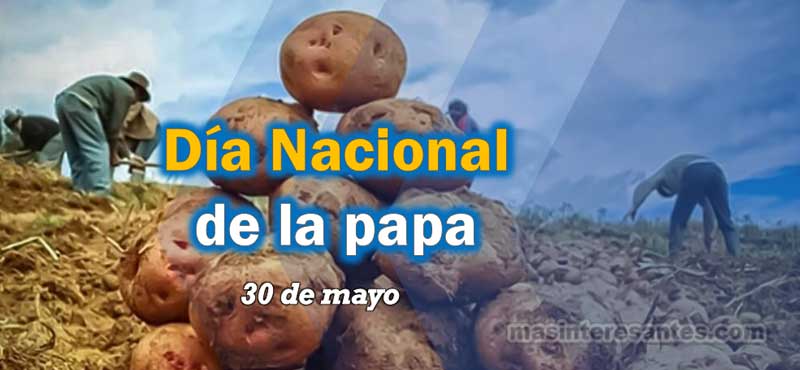
Cada 30 de mayo celebramos el Día Nacional de la Papa, una fecha especial que nos invita a reconocer el valor de uno de los alimentos más importantes de nuestra historia. Aunque la vemos a diario en nuestra mesa, pocas veces pensamos en el enorme recorrido que ha tenido este producto nacido en los Andes peruanos. La papa forma parte de nuestra identidad cultural, de nuestras tradiciones y de la alimentación de millones de personas. Por eso, esta celebración es una oportunidad para que estudiantes, docentes y familias reflexionen sobre la riqueza agrícola del Perú y el esfuerzo de quienes cultivan la tierra con dedicación y esperanza.
¿Qué se celebra en el Día Nacional de la Papa?
El Día Nacional de la Papa se conmemora cada 30 de mayo para rendir homenaje a uno de los mayores aportes del Perú al mundo. Este alimento, cultivado por nuestros antepasados desde hace miles de años, es hoy una pieza fundamental en la alimentación de numerosos países. Más que un simple ingrediente, la papa representa historia, cultura, tradición y trabajo. Además, es un símbolo del conocimiento agrícola desarrollado por las antiguas civilizaciones andinas.
El origen de la papa: una herencia que nació en los Andes
Un regalo del Perú para el mundo
La historia de la papa comenzó hace más de siete mil años en las montañas andinas. Nuestros antepasados aprendieron a cultivarla y conservarla mucho antes de que existieran las tecnologías modernas. Con el paso del tiempo, este tubérculo cruzó fronteras y océanos hasta llegar a Europa y posteriormente a otros continentes. Hoy, la papa es uno de los alimentos más consumidos del planeta y sigue siendo un motivo de orgullo para todos los peruanos.
¿Por qué se celebra el 30 de mayo?
La creación del Día Nacional de la Papa busca reconocer la importancia de este cultivo en la economía, la cultura y la alimentación del país. También promueve el consumo de las variedades nativas y la valoración del trabajo de miles de agricultores que mantienen viva esta tradición.
La importancia de la papa en nuestra sociedad
La papa está presente en muchas de nuestras comidas favoritas. Desde una causa limeña hasta un delicioso lomo saltado, este alimento ocupa un lugar especial en la gastronomía peruana. Sin embargo, su importancia va mucho más allá de la cocina. La producción de papa es una fuente de ingresos para miles de familias y contribuye al desarrollo de diversas comunidades rurales.
Además, el Perú posee más de 3,000 variedades de papa, una riqueza única que convierte a nuestro país en el principal centro de diversidad de este cultivo en el mundo.
Curiosidades que quizás no conocías sobre la papa
Existen papas de muchos colores
Aunque estamos acostumbrados a las papas amarillas o blancas, también existen variedades moradas, rojas, rosadas y hasta azules. Cada una tiene características y sabores particulares.
La papa llegó hasta el espacio
Gracias a sus cualidades nutricionales, la papa ha sido objeto de estudios científicos relacionados con la alimentación de futuras misiones espaciales.
Es uno de los alimentos más importantes del planeta
Millones de personas consumen papa diariamente debido a su valor nutritivo, su versatilidad y su capacidad de adaptarse a diferentes condiciones climáticas.
Importancia educativa del Día Nacional de la Papa
El Día Nacional de la Papa ofrece una valiosa oportunidad para aprender sobre nuestra identidad nacional y el respeto por el patrimonio natural del país. En las escuelas, esta fecha permite desarrollar actividades relacionadas con la biodiversidad, la agricultura, la alimentación saludable y la historia del Perú. Asimismo, fortalece valores como el respeto, la gratitud y el reconocimiento hacia quienes trabajan la tierra. Cuando los estudiantes conocen el origen de los alimentos que consumen, también desarrollan una mayor conciencia sobre la importancia de cuidar los recursos naturales y apoyar la producción local.
Ver fichas para colorear sobre el día de la papa.
Una fecha para valorar nuestras raíces
Celebrar el Día Nacional de la Papa 30 de mayo es reconocer la sabiduría de nuestros antepasados y el esfuerzo de las familias agricultoras que continúan preservando este valioso legado. Cada papa cultivada en los campos peruanos cuenta una historia de trabajo, tradición y amor por la tierra. Por ello, esta fecha nos recuerda que nuestras raíces siguen vivas en cada alimento que llega a nuestra mesa.
Reflexión final
La papa es mucho más que un alimento. Es parte de nuestra identidad, de nuestra historia y de la riqueza cultural que distingue al Perú ante el mundo. En este Día Nacional de la Papa, tomemos un momento para agradecer a quienes hacen posible que este producto llegue a nuestros hogares y reflexionemos sobre la importancia de valorar lo que nace de nuestra tierra.
¿Conoces alguna variedad de papa de tu región? Tal vez sea el momento perfecto para descubrirla y compartir su historia con los demás.